Stop Bogging Down Your PLCs
5 mins read
Published Jan 13, 2026
In the world of system integration, few debates are as persistent as the "PLC vs. HMI" responsibility split. While logic obviously belongs in the controller, alarm management occupies a grey area that often trips up even seasoned engineers.
If you are managing a massive facility with thousands of I/O points, where you handle your alarm configuration—descriptions, priorities, and shelving—can make or break your network performance.
Today, we’re diving into why modern SCADA platforms like Ignition or VTScada should handle the heavy lifting of alarm management, and how to balance that without losing control integrity.
The "Fat PLC" Problem in Large Facilities
Historically, many engineers were taught to keep everything in the PLC. The logic was simple: "The PLC is the source of truth."
While that’s true for machine control, it becomes a liability for alarm metadata.
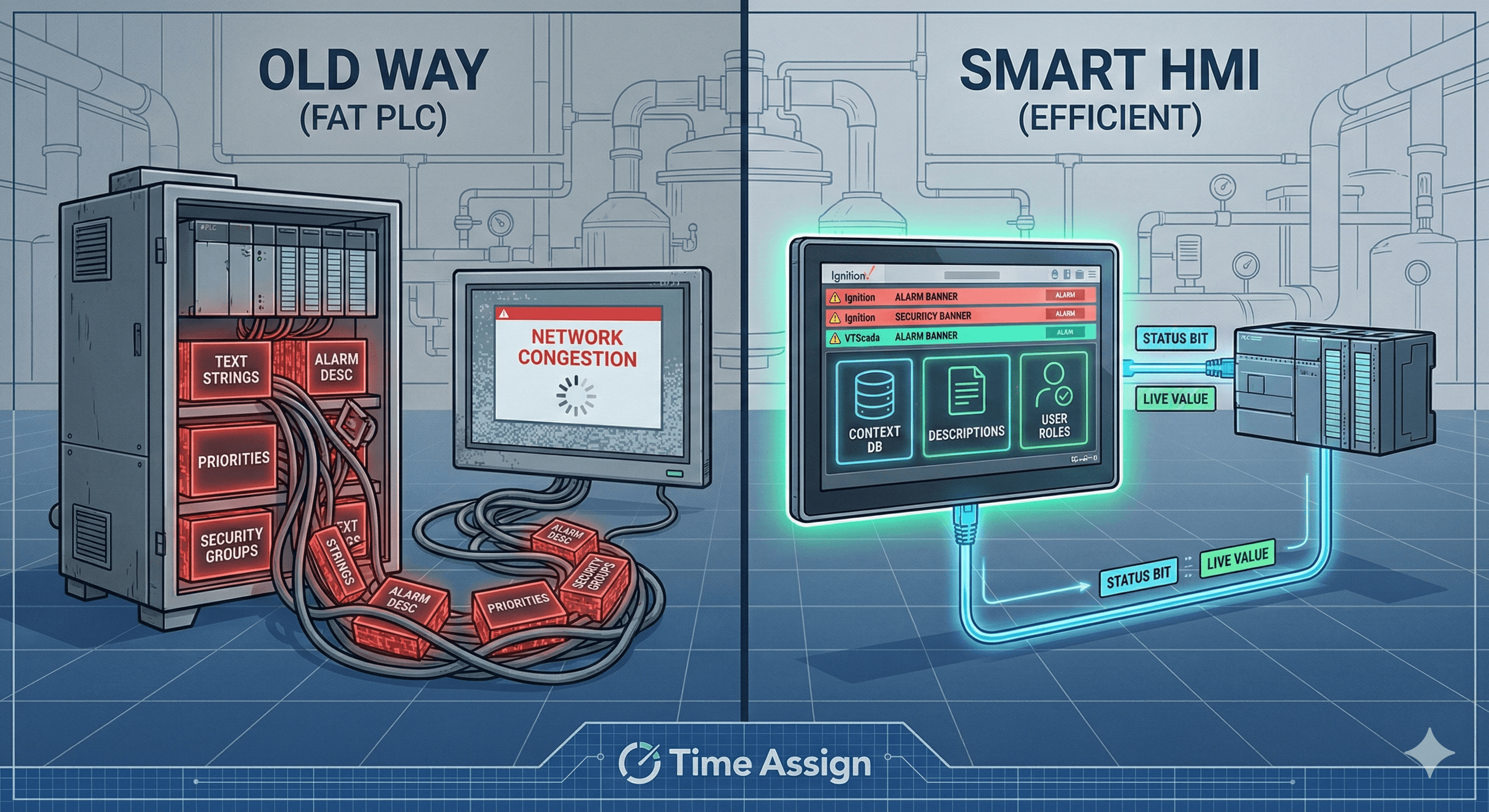
Imagine a facility with 5,000 alarms. If you store the alarm trigger, the description string, the priority integer, and the security group assignment all within the PLC memory, you are creating a massive data structure.
The Communication Bottleneck
When your SCADA system polls the PLC, it takes up valuable bandwidth.
Scenario A (PLC-Centric): The SCADA polls 5,000 complex UDTs (User Defined Types) containing strings and static data. The poll rate slows down, leading to laggy screens and stale data.
Scenario B (HMI-Centric): The SCADA polls 5,000 boolean bits (or packed DINTs). The HMI looks up the description, priority, and routing internally. The network load drops significantly.
For large-scale integrations, offloading static metadata (text descriptions, help screens, email lists) to the HMI is critical for maintaining a responsive network.
Alarms Are Not Always Control Points
One of the biggest misconceptions we see in junior engineering is conflating Alarms with Control Variables.
An alarm is a notification for an operator. A control variable is a state used by the PLC logic. They are often related, but they serve different masters.
The Pure Alarm: A "Door Open" switch on a secure panel might just need to log an event. The PLC doesn't change its machine logic based on it. In this case, the PLC should just provide the raw status bit. The HMI handles the alarming, the logging, and the notification.
The Control Interlock: A "High Temperature" trip that shuts down a heater is a control point. The PLC must act on this immediately.
Best Practice: The Hybrid Approach
You generally shouldn't make an alarm an "HMI Only" memory tag if it reflects a physical reality. That creates a disconnect where the operator sees one thing, but the controller sees another.
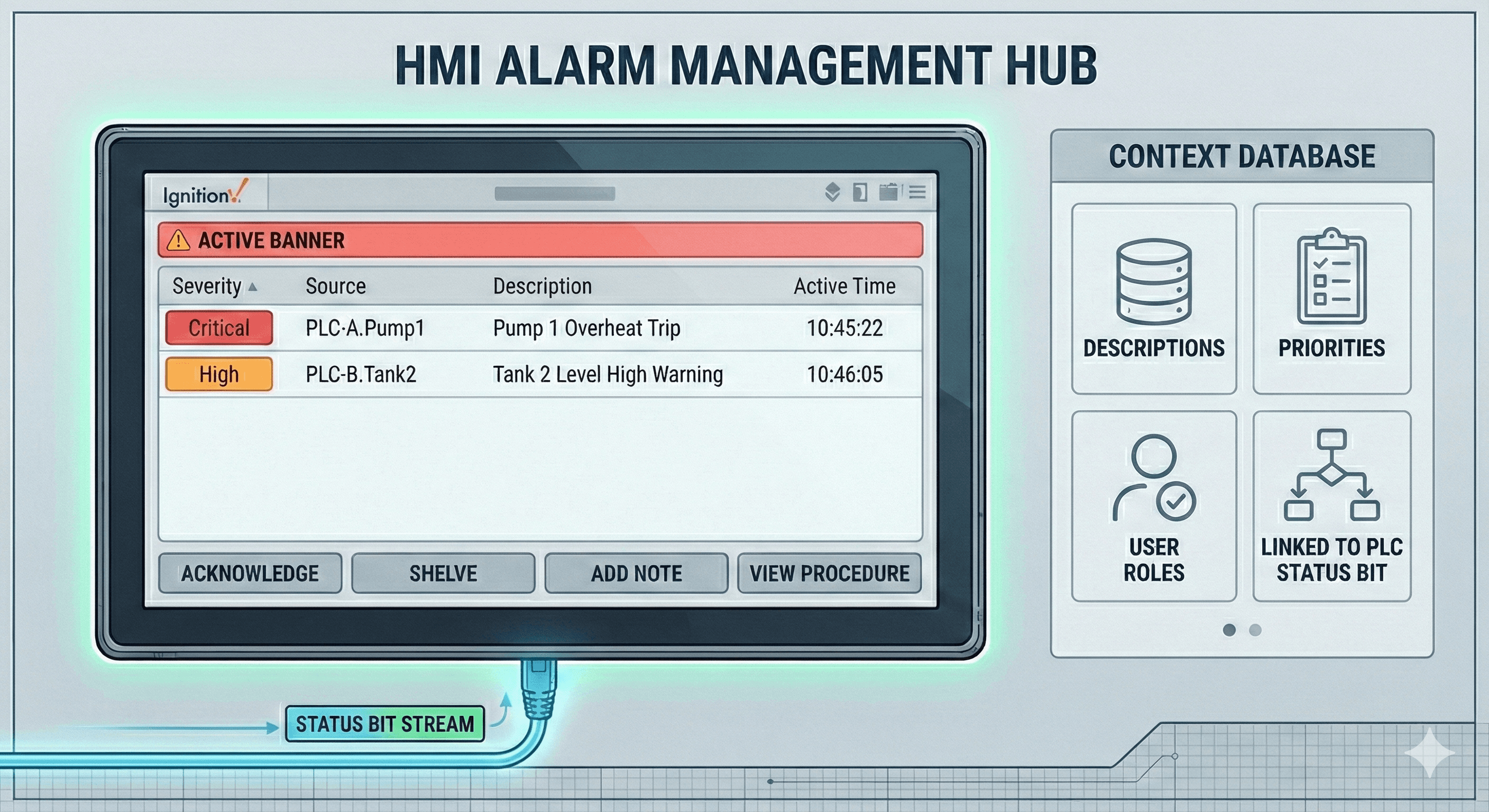
Instead, the HMI should read the status from the PLC, but the HMI should own the context.
If an alarm correlates with a control point (e.g., a High-Level Setpoint), do not hardcode that setpoint in the HMI's internal database alone.
Read: The HMI reads the live value from the PLC.
Update: When an operator changes the setpoint on the screen, the HMI updates the PLC tag.
Alarm: The HMI monitors that tag and triggers the alarm banner based on its own configuration database.
This keeps the PLC lean (handling values and logic) and the HMI robust (handling user experience and context).
Why Ignition and VTScada Win Here
Modern platforms like Ignition (Inductive Automation) and VTScada (Trihedral) have revolutionized this workflow. They allow for "Data-Driven" alarming.
Rather than creating a tag in the PLC called Tank_1_High_Alarm_Desc = "Tank 1 Level is High", you simply bring in the boolean bit Tank_1_High.
Inside the HMI software, you can use templates or UDTs to automatically generate the alarm description based on the tag path or metadata. This means:
Zero Network Overhead for the description text.
Instant Updates: Need to change "Tank 1" to "Fermenter 1"? You update it in the SCADA database, and you don't have to download code to the PLC or stop the processor.
Dynamic Security: You can change which user groups see which alarms on the fly without touching the controller code.
Summary: A Checklist for Integrators
Next time you are architecting a SCADA project, ask yourself these three questions before creating a new UDT in your PLC:
Is this text? If it is a description or a message, keep it in the HMI.
Does the PLC logic need this? If the PLC doesn't need to know the "Priority" is "Critical" to stop the motor, don't store the priority integer in the PLC.
Is it a control point? If yes, the value lives in the PLC, but the alarm configuration lives in the HMI.
By separating the Control Logic (PLC) from the Operational Context (HMI), you build systems that are faster to scan, easier to update, and more robust for the end-user.
More